Examples
The examples on this page showcase the available functionality of py_gearworks package and help learning the workflow.
Note
Some important lines are omitted below to save space, so you will most likely need to add 1 & 2 to the provided code below for them to work:
from py_gearworks import *To view the created objects, you can use the following commands:
in ocp_vscode simply use e.g.
show(gear_part_1,gear_part_2)orshow_all()can be used to automatically show all objects with their variable names as labels.in CQ-editor add e.g.
show_object(gear_part_1)To export parts, use build123d’s export functions, e.g.
export_stl(gear_part_1)
1. Basic Spur Gears
This example demonstrates the creation of two spur gears with different number of teeth.
Note
The default (unspecified) values are module=1 and height=1 .
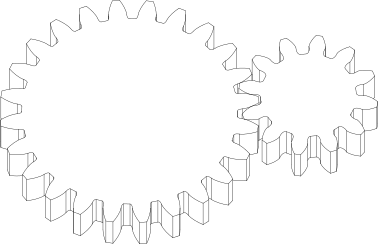
    gear1 = SpurGear(number_of_teeth=12, module=1.2, height=5)
    gear2 = SpurGear(number_of_teeth=24, module=1.2, height=5)
    gear1.mesh_to(gear2, target_dir=RIGHT)
    gear_part_1 = gear1.build_part()
    gear_part_2 = gear2.build_part()
2. Inside Ring Gears
Example with a ring-gear for planetary drive construction.
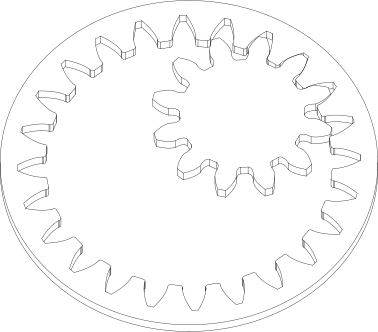
    gear1 = SpurGear(number_of_teeth=12)
    gear2 = SpurRingGear(number_of_teeth=24)
    gear1.mesh_to(gear2, target_dir=RIGHT + UP)
    gear_part_1 = gear1.build_part()
    gear_part_2 = gear2.build_part()
3. Profile shifts
Create profile shifted gears. Use the tip_truncation parameter to avoid sharp tips.
When unspecified, tip_truncation defaults to 0.2.
This results in 0.2 module reduction of addendum radius compared to the sharp tips radius.
Note
The mesh_to() function calculates accurate zero-backlash meshing of gears with profile_shift parameter.
For profile shifted gears, this is slightly shorter distance than the nominal center distance, and may lead to interference at the root.
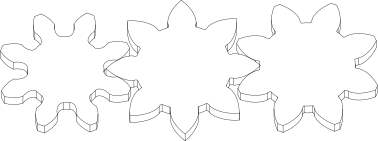
    gear1 = SpurGear(number_of_teeth=8)
    gear2 = SpurGear(number_of_teeth=8, profile_shift=0.7, tip_truncation=0)
    gear3 = SpurGear(number_of_teeth=8, profile_shift=0.7, tip_truncation=0.2)
    gear1.mesh_to(gear2, target_dir=LEFT)
    gear3.mesh_to(gear2, target_dir=RIGHT)
    gear_part_1 = gear1.build_part()
    gear_part_2 = gear2.build_part()
    gear_part_3 = gear3.build_part()
4. Helical Gears
Create Helical Gears. Positive helix angle is right-handed, negative is left-handed.
Use positive and negative values to create a common helical pair. The gears are calculated with the ‘normal’ (tool-parameter) system,
as opposed to the ‘transverse’ system. The mesh_to() function can account for different helix angles. Use the value PI/4 for 90° crossed helicals.
The class HelicalRingGear is also available for planetary drives with helical gears.
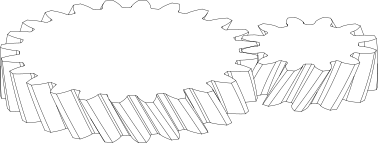
    gear1 = HelicalGear(number_of_teeth=12, height=5, helix_angle=PI / 6)
    gear2 = HelicalGear(number_of_teeth=24, height=5, helix_angle=-PI / 6)
    gear1.mesh_to(gear2, target_dir=RIGHT)
    gear_part_1 = gear1.build_part()
    gear_part_2 = gear2.build_part()
4.5. Crossed Helical Gears
Create crossed helical gears with 90° angle between axes. Use positive helix angle on both gears for a common pair.
The mesh_to() function can account for different helix angles and axis angles.
Extreme values of helix angle can approximate worm-gear like geometry, but actual worm-gears are not yet supported.
A proper worm-wheel conforms to the worm-screw, resulting in a complex 3D shape which is not yet supported.
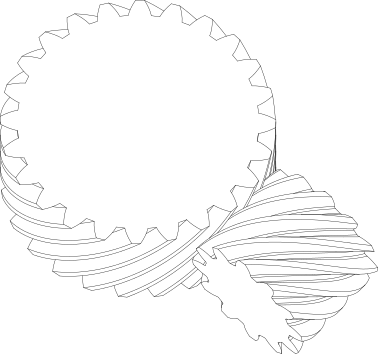
    gear1 = HelicalGear(number_of_teeth=12, height=15, helix_angle=PI / 4, z_anchor=0.5)
    gear2 = HelicalGear(number_of_teeth=24, height=15, helix_angle=PI / 4, z_anchor=0.5)
    gear1.mesh_to(gear2, target_dir=RIGHT)
    gear_part_1 = gear1.build_part()
    gear_part_2 = gear2.build_part()
5. Crowning
Crowning is a feature that gradually reduces tooth width from the middile towards the top/bottom face, resulting in a barrel-like side profile.
Crowning can help against axial alignment errors, ensures gears don’t make first contact on the edges.
The parameter crowning has a 1E-3 conversion factor, so values in the range of 100-200 have visible effect.
The value of 1 corresponds to 0.001 module arc length reduction of tooth flank on both left-right sides.
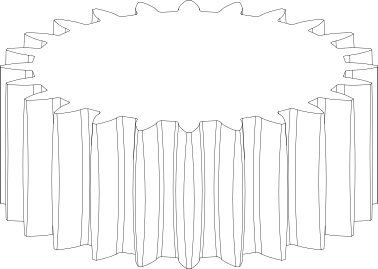
    gear1 = SpurGear(number_of_teeth=24, height=10, crowning=200)
    gear_part_1 = gear1.build_part()
6. Bevel Gears at 90°
Create simple bevel gears at 90° angle.
The function cone_angle_from_teeth() can be used to calculate appropriate cone angles for given number of teeth and given angle between axes.
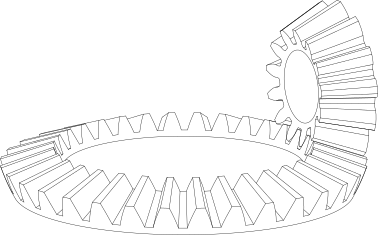
    n1 = 13
    n2 = 32
    cone_angle1, cone_angle2 = cone_angle_from_teeth(n1, n2, axis_angle=PI / 2)
    gear1 = BevelGear(number_of_teeth=n1, cone_angle=cone_angle1, height=5)
    gear2 = BevelGear(number_of_teeth=n2, cone_angle=cone_angle2, height=5)
    gear1.mesh_to(gear2, target_dir=RIGHT)
    gear_part_1 = gear1.build_part()
    gear_part_2 = gear2.build_part()
Note
Bevel gears are implemented with octoid tooth profile. Undercuts are supported for bevel gears. Top and bottom face of bevel gears follow spherical surface (not conic).
7. Spiral Bevel Gears
Spiral bevel gears are under development, but you can already create them with the following code. The spiral geometry follows an euclidean spiral, which is mathematically simple, but is not realistic. Axis offset (hypoid) geometry is not yet supported.
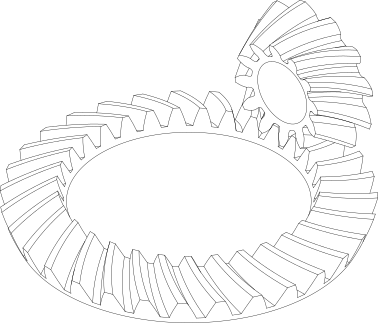
    n1 = 12
    n2 = 31
    cone_angle1, cone_angle2 = cone_angle_from_teeth(n1, n2)
    gear1 = BevelGear(
        number_of_teeth=n1, cone_angle=cone_angle1, height=5, helix_angle=0.5
    )
    gear2 = BevelGear(
        number_of_teeth=n2, cone_angle=cone_angle2, height=5, helix_angle=-0.5
    )
    gear1.mesh_to(gear2, target_dir=RIGHT + UP)
    gear_part_1 = gear1.build_part()
    gear_part_2 = gear2.build_part()
8. Cycloid Gears
Create gears wit cycloid geometry. Cycloids have no pressure angle as a parameter, but are rather defined by the radii of the generator rolling circles.
These generator circles are controlled by the inside_cycloid_coefficient and outside_cycloid_coefficient parameters.
The rolling circles need to match for meshing gears.
The adapt_cycloid_radii function can be used to adjust the outside rolling circles of gears for appropriate meshing.
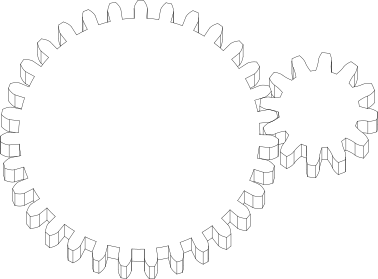
    n1 = 12
    n2 = 31
    gear1 = CycloidGear(number_of_teeth=n1, height=5, inside_cycloid_coefficient=0.25)
    gear2 = CycloidGear(number_of_teeth=n2, height=5, inside_cycloid_coefficient=0.5)
    gear1.adapt_cycloid_radii(gear2)
    gear1.mesh_to(gear2, target_dir=RIGHT)
    gear_part_1 = gear1.build_part()
    gear_part_2 = gear2.build_part()
9. Racks
Create straight racks with the InvoluteRack class.
Racks are developed separately from the gear class structures, so not all features of gears are available for racks.
Racks can use mesh_to() function for positioning next to gears, but gears can’t mesh_to() racks (missing feature for now).
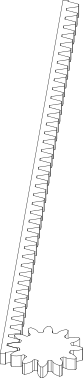
    n_gear = 12
    n_rack = 40
    gear = SpurGear(number_of_teeth=n_gear, module=2, height=5, profile_shift=0.25)
    rack = InvoluteRack(number_of_teeth=n_rack, module=2, height=5)
    rack.mesh_to(gear, target_dir=LEFT, offset=19)
    gear_part = gear.build_part()
    rack_part = rack.build_part()
10. Helical Racks
The HelicalRack class can be used to create racks matching to HelicalGear class.
While InvoluteRack class also has beta angle input which corresponds to helical angle,
the HelicalRack class also accounts for normal-transverse system conversions to directly match the HelicalGear class.
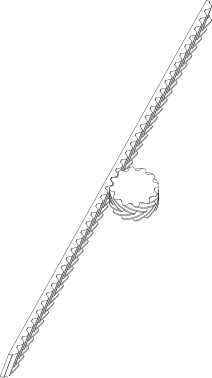
    n_gear = 12
    n_rack = 40
    gear = HelicalGear(
        number_of_teeth=n_gear,
        module=2,
        height=25,
        helix_angle=PI / 3,
        herringbone=True,
    )
    rack = HelicalRack(
        number_of_teeth=n_rack,
        module=2,
        height=25,
        helix_angle=PI / 3,
        herringbone=True,
    )
    rack.mesh_to(gear, target_dir=LEFT, offset=0)
    gear_part = gear.build_part()
    rack_part = rack.build_part()
11. Controlling backlash
Backlash in general is defined as a coefficient of module. It represents the distance between inactive surfaces of teeth of meshing gears, or, equivalently, circumferential play calculated at the base circle (warning: not pitch circle!).
The mesh_to() function has a backlash parameter to control the distance between meshing gears.
Backlash can also be defined for individual gears with the backlash parameter.
In this case backlash is realized by reducing the tooth thickness.
When backlash parameter is not defined for the mesh_to() function, the sum of the backlash values of the two gears is used.
When backlash is defined for the mesh_to() function, the axial distance between the gears is calculated such that the prescribed backlash is achieved.
Note
Highly profile shifted gears with low or zero backlash may lead to interference at the root of the tooth.
Backlash calculation for mesh_to() function is only available for spur gears and helical gears with parallel axis. For helicals, it is defined in the transverse plane. Bevel gears and crossed helical gear backlash can only be defined for tooth parameters, not for mesh_to() function.
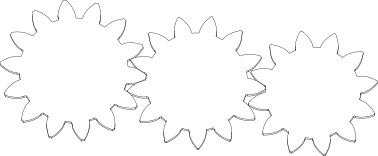
    gear1 = SpurGear(12, module=2, profile_shift=0.7, backlash=0.1)
    gear2 = SpurGear(13, module=2, profile_shift=0.6, backlash=0.1)
    gear3 = SpurGear(
        14,
        module=2,
        profile_shift=0.5,
    )
    gear1.mesh_to(gear2, target_dir=RIGHT, angle_bias=1)
    gear3.mesh_to(gear2, target_dir=LEFT, backlash=0, angle_bias=0)
    gear_part_1 = gear1.build_part()
    gear_part_2 = gear2.build_part()
    gear_part_3 = gear3.build_part()